Invoicing & Payments

Get paid without chasing. Charge the job when it’s done.

For owners tired of chasing payments. Send invoices, keep cards on file and charge a job the moment your crew marks it done.

30-day free trialNo cardNo contract

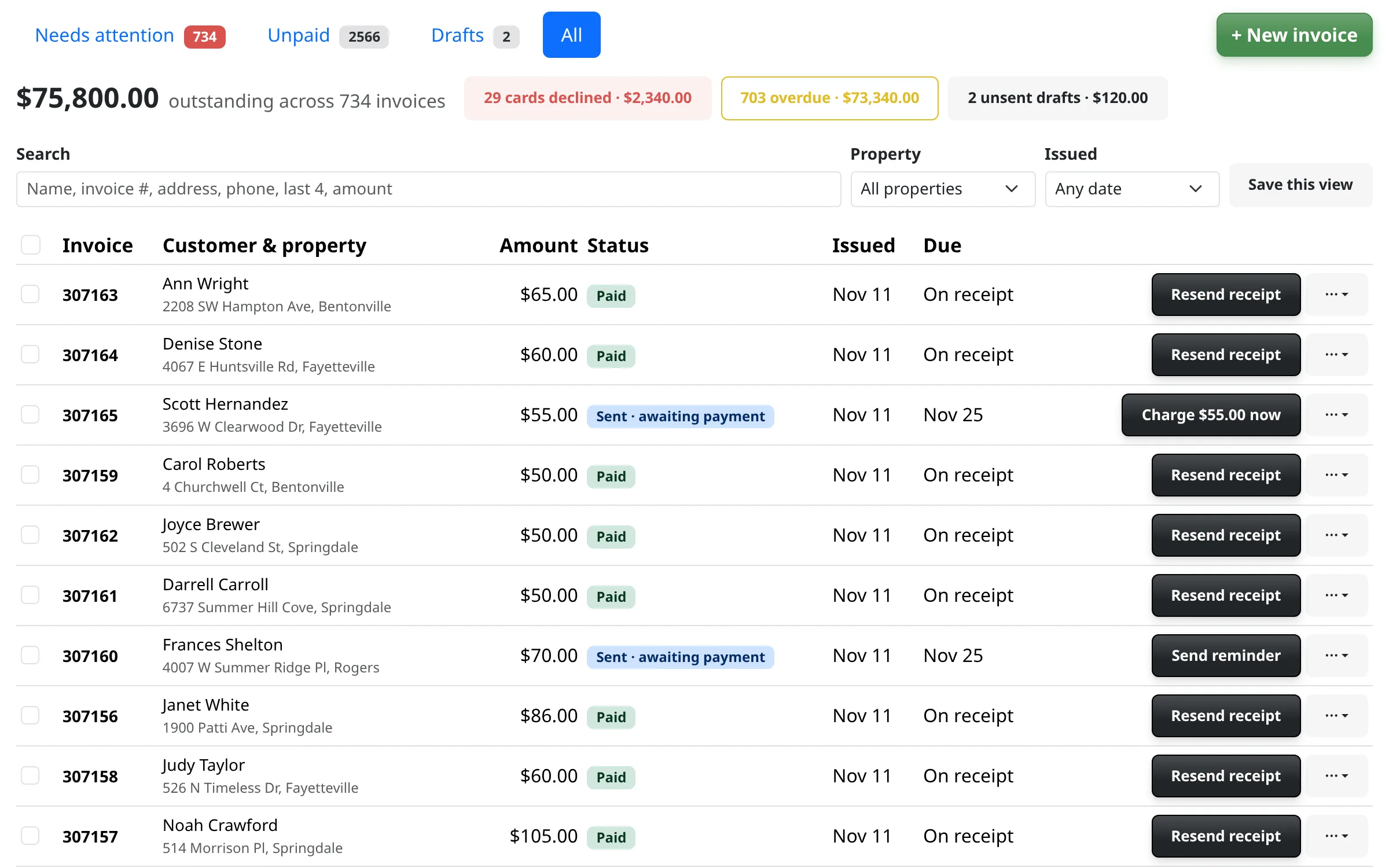
The Invoices tab showing paid and sent invoices, with the total outstanding and the amount overdue at the top.

Chasing payments eats your evenings

The job is done on Tuesday and the invoice goes out on Friday. Then comes the text, the second text and the check in the mail. Meanwhile the money you earned is sitting in somebody else’s account.

From job done to money in your bank

Charge the job when it’s done

Turn on automatic charging and the card on file is charged as soon as your crew marks the job done. A customer without a card gets a payment link instead.

  • It is one setting, and you can turn it off any time
  • Invoices can be created and sent for you when a job is completed
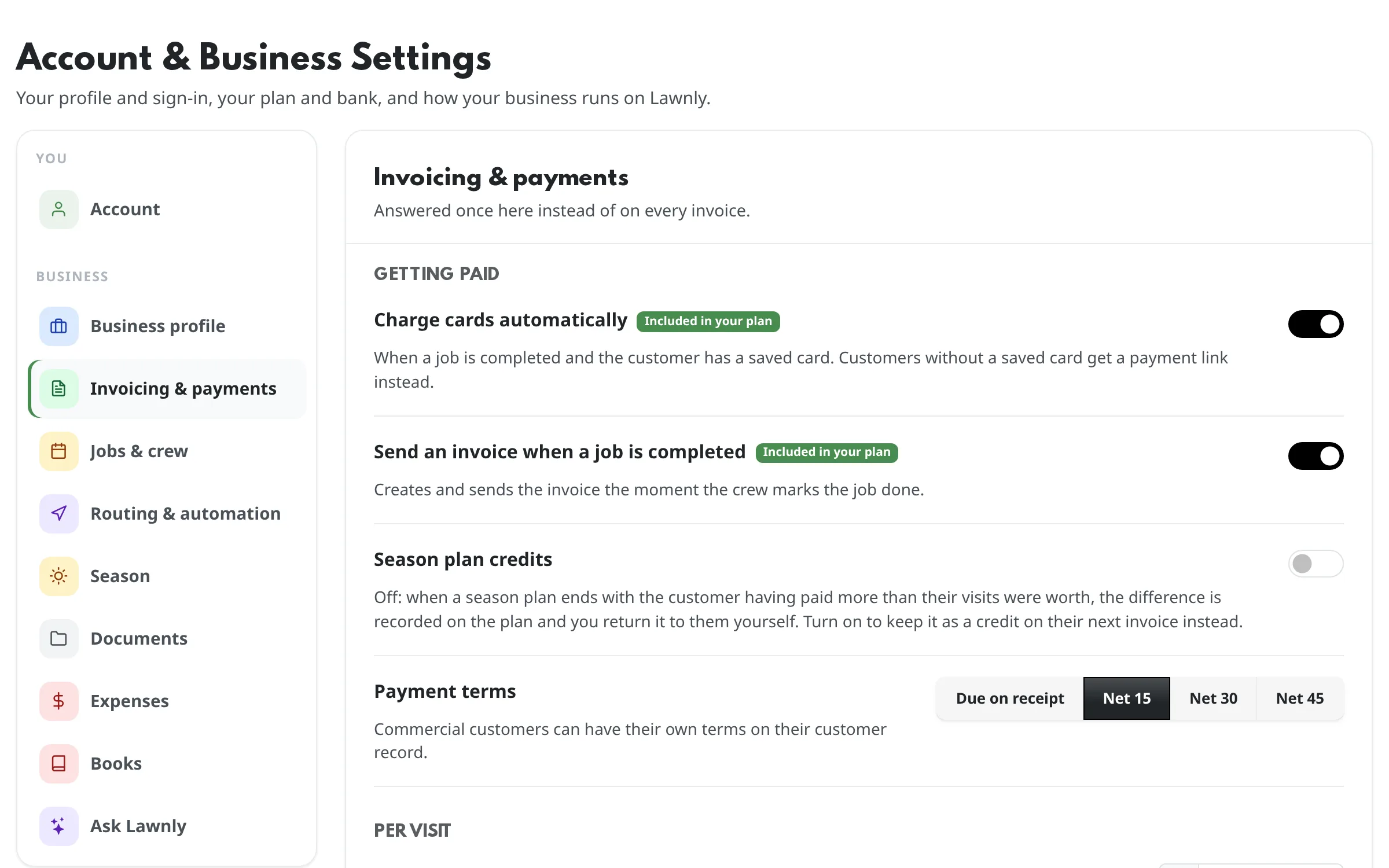
The Invoicing and payments settings: charge cards automatically, and send an invoice when a job is completed.

Get a card on file once

Send a card request by email or text, or type in a card the customer gave you. They add it on a secure Lawnly page, and the card number goes straight to the payment processor.

  • Ask many customers at once
  • See who has a card and who needs one in the customer list

See who owes you, then send the reminder

The Invoices tab shows what is outstanding and what is overdue. Remind one customer or several with a tap, or let Lawnly remind them after the due date, never more than three times.

  • Reminders go by email, and by text to customers who agreed to texts
  • A declined card is retried for you, and the customer can be sent a payment link
Lawnly assistantExample
Which invoices are overdue?
9 overdue invoices, $2,310 in all. 5 have a card on file. Charge those 5?
Charge 5

Let customers pay part, or pay the way they like

Allow partial payments on an invoice and the rest stays due. A customer who pays by check or cash? Record it on the invoice and it’s marked paid.

  • Payment terms from due on receipt to net 45
  • Refund all of a card payment, part of it, or one line item

Bill the way the customer buys

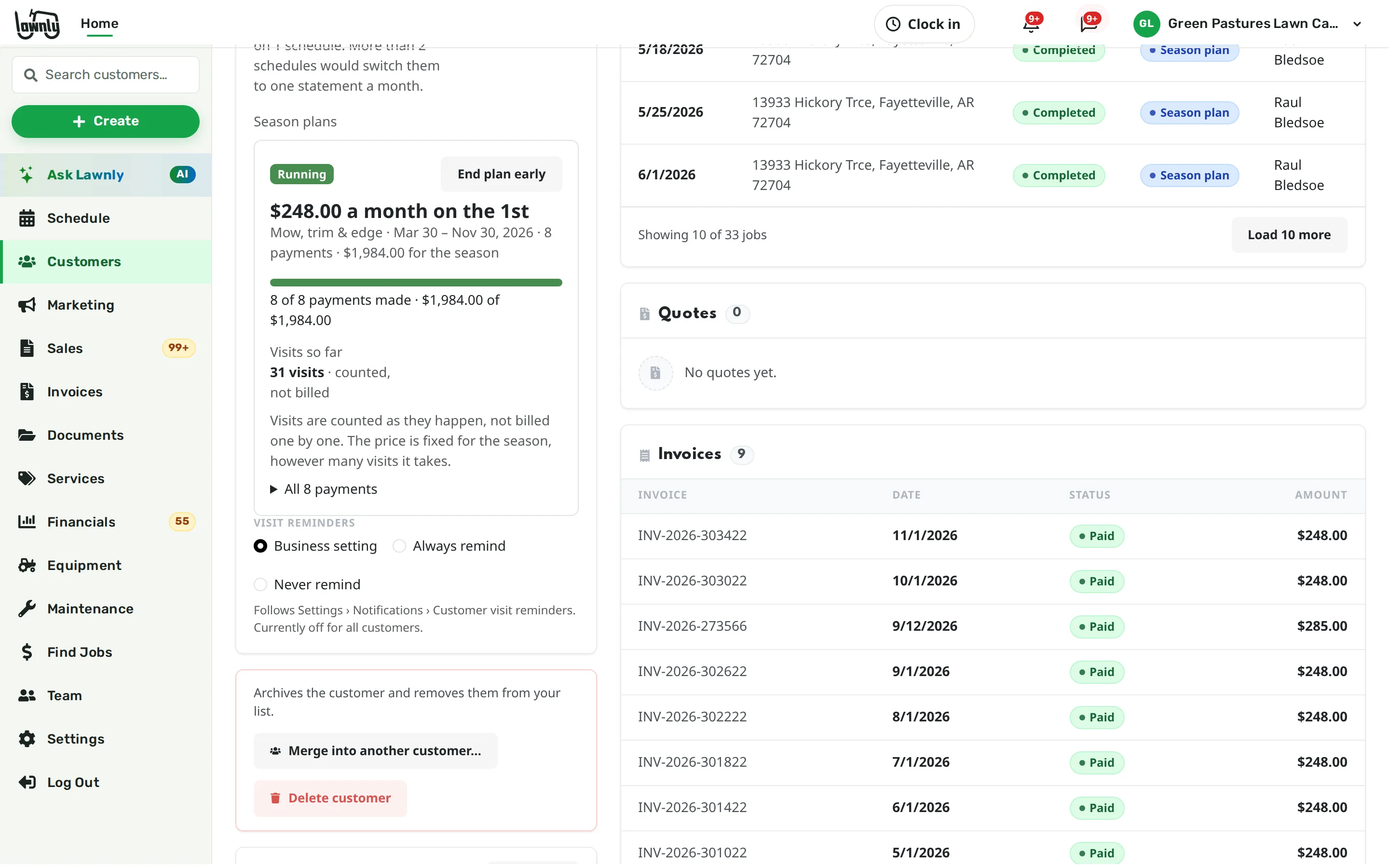
Bill after every visit, or put a customer on one statement a month. For seasonal work, start a season plan: one price for the season, paid monthly or all at once.

A customer’s billing card with a season plan for weekly mowing, paid in eight monthly payments.

Know when your payout lands

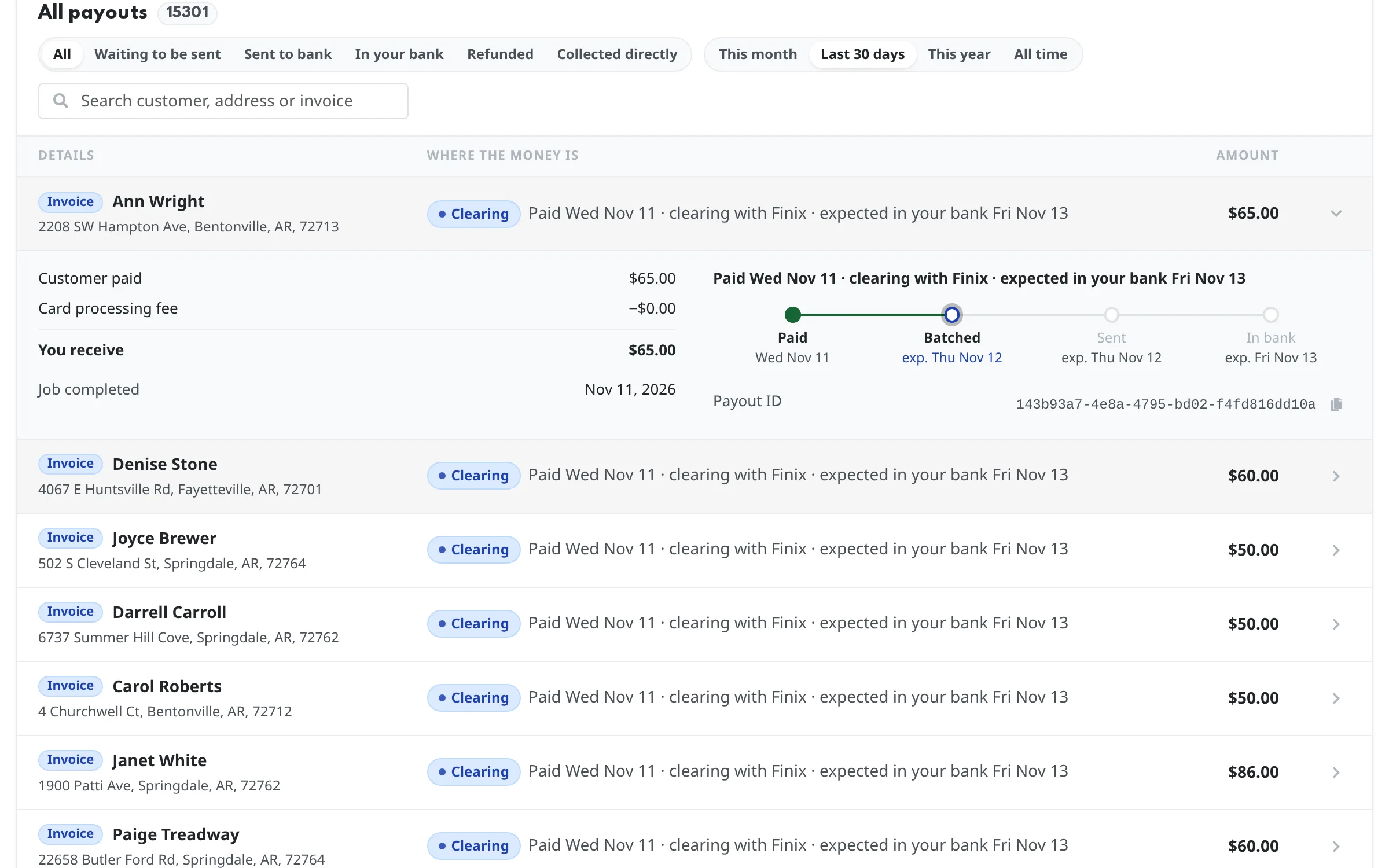
The Payouts page lists every payment and the step it is on: paid, batched, sent, in your bank. Most owners see the money 3–5 days after a job is done.

  • See the day each payment should reach your bank
  • Open any payment for its full timeline
The Payouts page with a list of payments and one payment’s timeline from paid to batched, sent and in your bank.

You see the cost first

No surprises on a card payment

Before you charge, the invoice shows what the customer pays, the card processing cost and an estimate of what reaches your bank.

  • Charging a card asks you to confirm the amount first.
  • Charging cards and issuing refunds each have their own permission, so you decide who can do them.
  • The assistant asks before it charges any card.
  • Every payment, reminder and refund is recorded in the invoice’s history.

Say it, it’s done

Ask for the numbers or the collection. The assistant checks with you before it charges a card. Every exchange is an example.

Lawnly assistantExample
Who still owes me from September?
6 customers owe $1,840 from September. 4 of them have a card on file. Charge those 4?
Lawnly assistantExample
From the crew app
Job done at 123 Oak St. · 2 photos · location confirmed
Automatic charging is on: $65 charged to the card on file.
Lawnly assistantExample
What did I bill in September, and what's still unpaid?
$24,600 billed in September. $1,840 is still unpaid across 6 customers.
  • 3–5 days
    From job done to money in your bank
    on average
  • 1,100+
    Lawn care businesses on Lawnly
“Lawnly makes routing and billing painless. I finish faster and get paid without chasing anyone.”
Mike Dunn, All American Services
Mike Dunn
All American Services
Ward, AR

Which plan fits

Start with Solo.

Invoices, cards on file, reminders, refunds, payouts, and automatic charging and invoices when a job is done are all on Solo, so every plan gets paid the same way.

Compare every plan

Solo
$25/month
  • 1 crew
  • 2 users
  • 150 AI messages a month
  • 100 customer texts a month

30-day free trial · No card · No contract

Questions owners ask

When do I get my money?

Most owners see it 3–5 days after the job is done. The Payouts page shows each payment’s steps and the day it should reach your bank. Banks only move money on bank days, so a weekend or holiday adds time.

What does it cost to take a card payment?

Lawnly adds no fee of its own. The card processor takes 2.9% + 30¢ plus card network fees, and the invoice shows it, with an estimate of what reaches your bank, before you charge.

What if a customer’s card is declined?

Lawnly retries it for you on a schedule you choose, and can email the customer a payment link after the last try. By default you are told too.

Do customers have to pay online?

No. Record a check, cash or bank transfer on the invoice and it is marked paid or partly paid. Recording moves no money through Lawnly.

Can I charge a saved card without asking each time?

Yes, for a card the customer agreed to save for your lawn care, recurring visits included. Lawnly records how and when each card was given.

Less paperwork. More lawns.

Try Lawnly free for 30 days. No card, no contract. Run it from the dashboard, or just tell it what you need.

30-day free trialNo cardNo contract