Snow removal

Bill snow your way. Per visit, per inch, per season.

For lawn companies that plow and shovel in winter. Charge by the visit, by how much it snowed, or one price for the season, and bill it without a spreadsheet.

30-day free trialNo cardNo contract

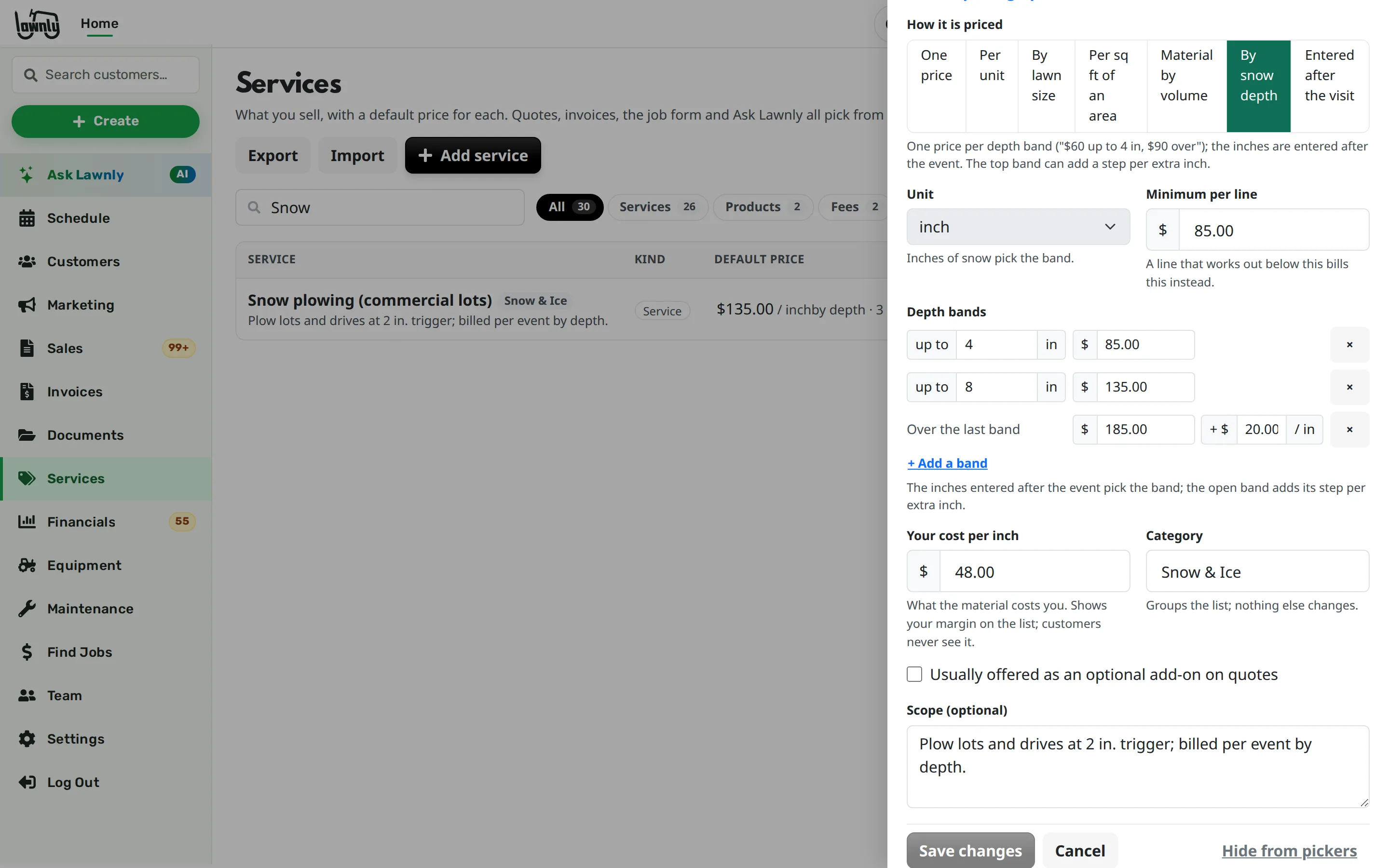
Snow plowing in Lawnly priced by depth bands: one price up to 4 in, another up to 8 in, and a step per extra inch above that.

You can’t price a storm in advance

Two inches or eight, the price is different. Some customers want a contract, some want a bill per push, and you’re working all night. The paperwork waits until the snow is gone.

Three ways to charge for snow, one place to run it

Pick the way each customer wants to pay. The crew’s job stays the same.

Charge by how much it snowed

Set snow removal up with depth bands: a price for up to 2 inches, up to 4, and more past that. After the visit, enter the inches and Lawnly picks the band.

  • Add a price for each extra inch past your top band
  • Or charge a flat price for one visit instead
  • Nothing is billed until the inches are in
Sell a season contract

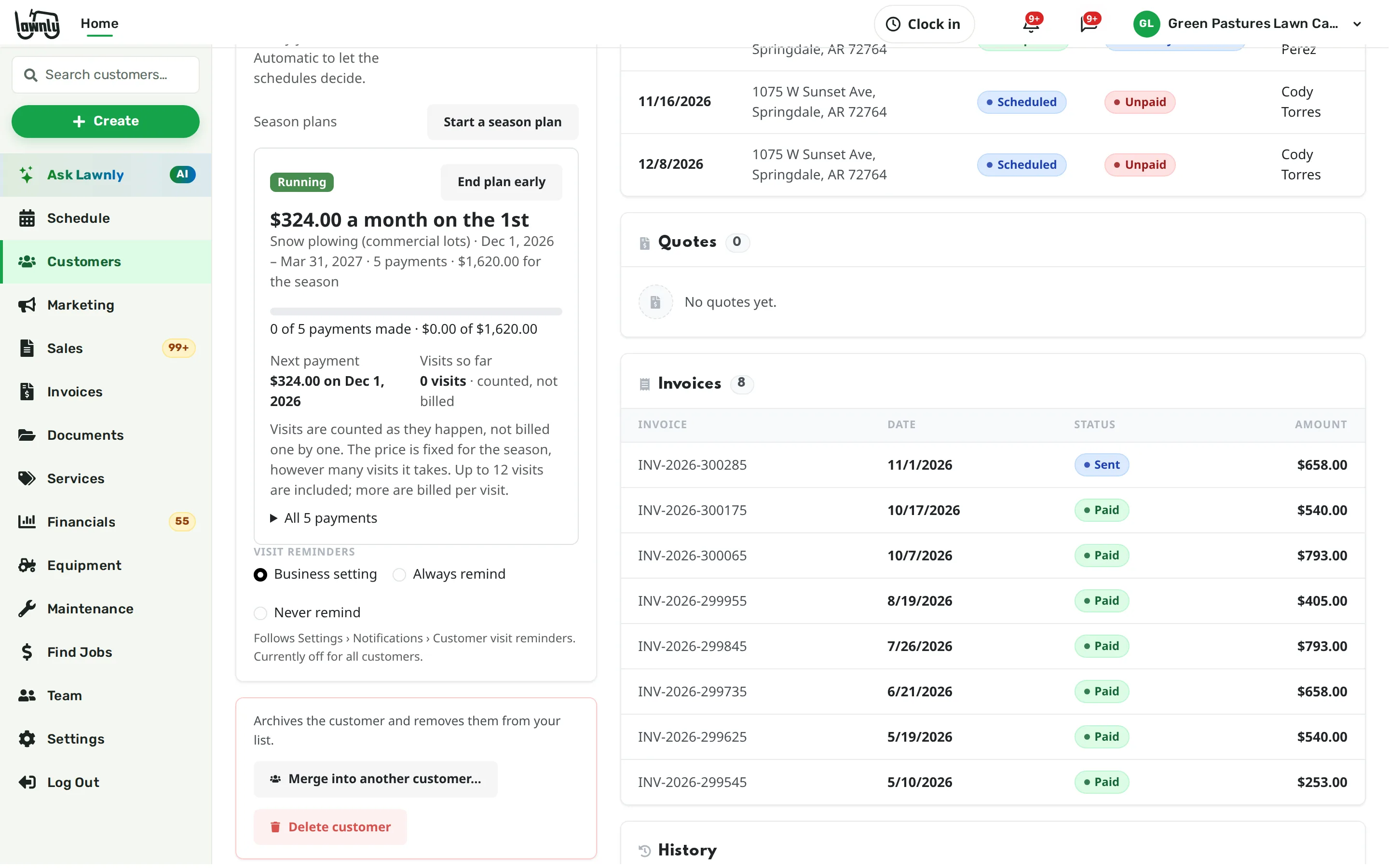
Start a season plan for the customer: one price for the winter, paid in monthly payments or all up front. Set how many visits it includes, and extra visits are billed one by one.

  • Visits under the plan are counted, not billed
  • End a plan early and Lawnly shows what is owed or credited
A customer’s billing card in Lawnly with a snow season plan that includes 12 visits, with monthly payments starting December 1.

Bill per visit, plain and simple

For customers who want to pay as they go, set a price per visit and bill after each one. Customers with several recurring services can be billed one statement a month instead.

Move a day, or clear it

Storm pushed your day? Move the unfinished visits to the next working day in one step, or clear a day or a range and bring it back within 7 days. Then text the customers who agreed to texts.

Lawnly assistantExample
Anything not done today, move to tomorrow.
Moved 9 unfinished visits to tomorrow. 9 of those customers get texts. Let them know?
Send

Crews work their stops from the app

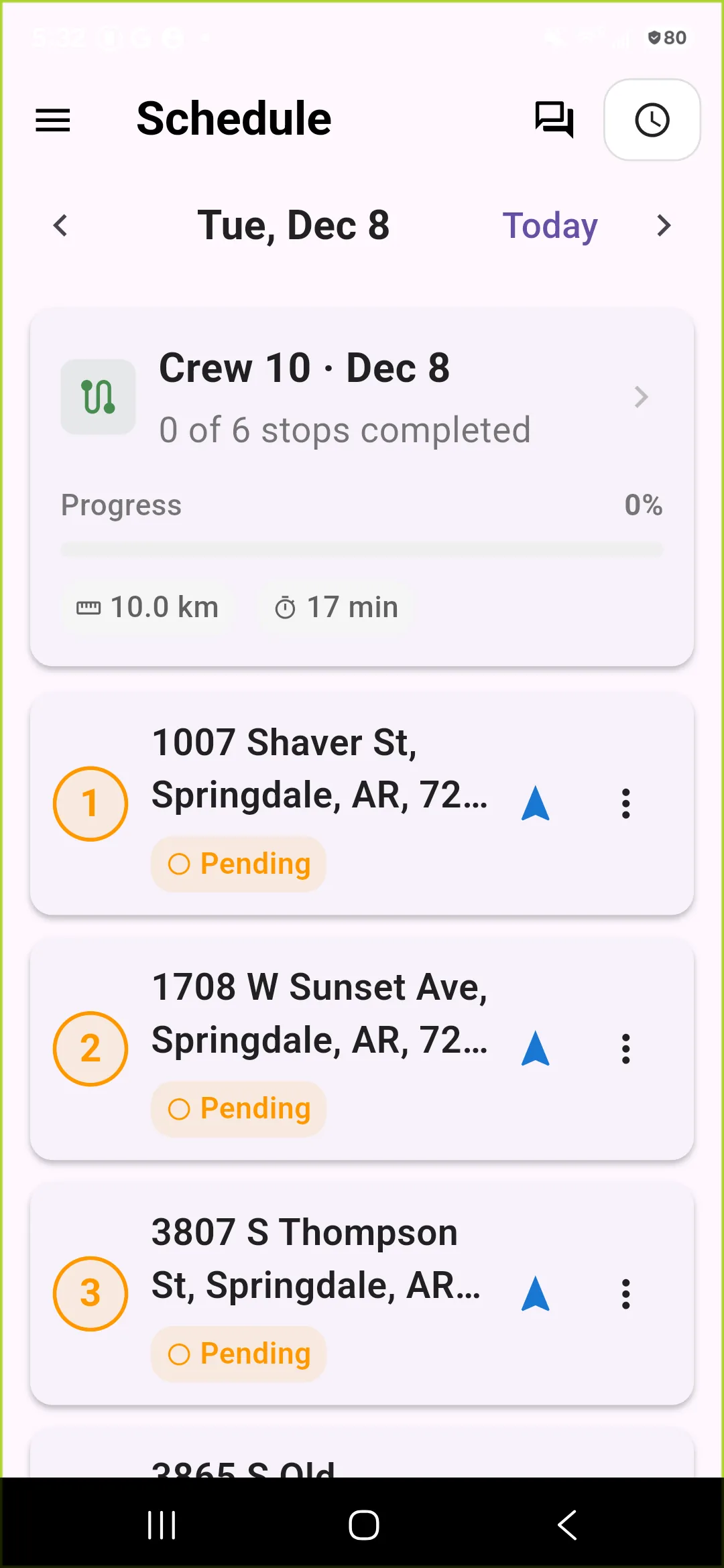
Give each crew its visits for the day and its stops in order. The crew lead opens the app, gets directions and taps done, with photos of the cleared lot if you want them.

ExampleThe Lawnly crew app’s schedule for a December day: one crew’s six snow stops in order, each with directions.

Say it. It’s billed.

Type it or say it. Lawnly checks with you before anything reaches a customer or moves money.

Lawnly assistantExample
The Johnson plow visit was 5 inches.
Entered 5 inches on the Johnson plow visit. At your depth bands that comes to $120.
Lawnly assistantExample
Charge the Smith snow visit $150 flat.
Charged the Smith snow visit as a flat $150 instead of by the inch.
Lawnly assistantExample
Put the Garcias on a season plan: $900, 5 monthly payments, 12 visits included.
Ready to start a season plan for the Garcias: $900 over 5 monthly payments, 12 visits included. Start it?
Start plan
  • 3–5 days
    From job done to money in your bank
    on average
  • 1,100+
    Lawn care businesses on Lawnly

Which plan fits

Start with Crew.

Depth bands, season plans, texts and automatic charging when a visit is completed are on every plan, so a plowed lot is paid for as soon as it is done. Crew adds more crews for a big route.

Compare every plan

Crew
$99/month
  • Up to 3 crews
  • 8 users
  • 1,000 AI messages a month
  • 600 customer texts a month

30-day free trial · No card · No contract

Questions owners ask

Does Lawnly send my crews out when it snows?

No. You decide when to go, and Lawnly doesn’t watch the weather or dispatch crews on its own. Once you do, the stops are on each crew’s route in the app.

Can I bill by the inch?

Yes. Set depth bands for snow removal, then enter the inches after each visit. Lawnly picks the band, and adds a rate for each inch past your top band if you set one.

How do season contracts work?

A season plan is one price for the winter, paid monthly or up front. You can set the number of visits it includes, and visits past that are billed one by one.

Can I text all my snow customers?

You can text the customers who agreed to texts. Pick who gets it, write the message, preview it and send. Customers who haven’t agreed to texts are skipped.

Can I run my mowing and my snow in the same account?

Yes. Snow removal is one of your services alongside mowing, cleanups and the rest, and each customer can have both.

Less paperwork. More lawns.

Try Lawnly free for 30 days. No card, no contract. Run it from the dashboard, or just tell it what you need.

30-day free trialNo cardNo contract